


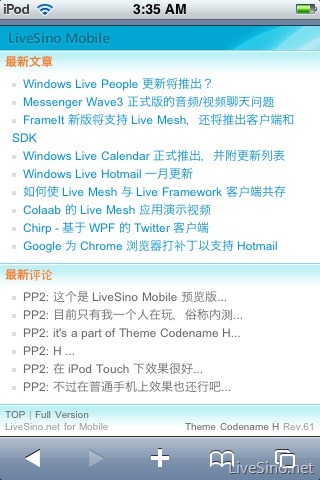
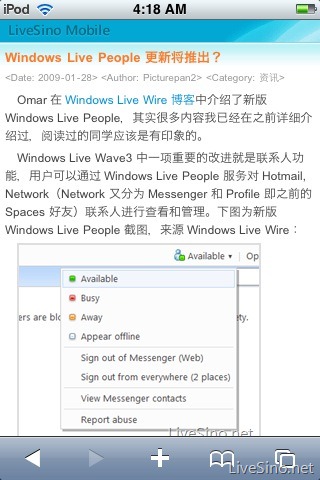
Theme Codename H 也包括为移动设备:手机、iPod Touch 等准备的移动版(之前也介绍过该移动版,在线演示: http://m.livesino.net)。该移动版是在 WordPress 2.7 及以上版本测试,可以正常使用。
Theme Codename H – 移动版 安装方法
- 从这里选择下载移动版 zip 包(中文版);
- 解压,并将 m 文件夹上传至 WordPress 安装根目录下;
- 修改 m-config.php 文件中的 第 4 行,将 http://m.livesino.net 改为自己的移动版域名,推荐采用二级域名,比如:http://m.livesino.net 。
注意,Theme Codename H – 移动版默认不启用 mod_rewrite 功能,文章的地址为 http://***/?p=post_id 。若想使用 mod_rewrite,找到以下几行,按照我给出的语句修改即可:
1. m-core.php 文件中的
?p=". $comment->comment_post_ID ."
替换为
". $comment->comment_post_ID .".html
2. index.php 文件中的
?p=<?php the_id(); ?>
替换为
<?php the_id(); ?>.html
Zip 包中已经包括 .htaccess 规则文件,无需自己编写规则,即使要修改也不难的。寻求更多帮助?或帮助完善?留言,Email 或者 Twitter。
17 条评论
盆地
用上了,非常好,非常感谢!
2009 年 02 月 15 日 1:04 下午
盆地
@盆地 可惜只能看到最新的几篇文章
2009 年 02 月 15 日 1:12 下午
Picturepan2
@盆地 恩,我的想法是,既然是手机上看,主要就是看最新的,若要看以后的电脑上就可以叻。。
2009 年 02 月 15 日 2:30 下午
CoolGuy
移动版的不能下载了,博主看看
2009 年 03 月 27 日 1:07 下午
Picturepan2
已经恢复叻。抱歉。
2009 年 03 月 28 日 5:32 下午
Kira
求救吖,我“将 m 文件夹上传至 Wordpress 安装根目录”,“修改 m-config.php 文件中的 第 4 行,将 http://m.livesino.net 改为自己的移动版域名”之后,进去我自己的 m 版域名,如 “http://127.0.0.1/m”,我看不到日志标题和内容吖!! TT 是不是还要安装什么插件或者我漏了什么步骤?
2009 年 06 月 06 日 10:32 上午
Picturepan2
@Kira 默认就这样安装的。没有其他步骤了。但具体问题我说不上额。
2009 年 06 月 06 日 10:47 上午
Kira
为什么我开启Gravatars插件之后,会出现两个头像的?(一个是系统默认的)
2009 年 06 月 06 日 1:34 下午
Picturepan2
@Kira 额,哪里出现两个头像额?
2009 年 06 月 06 日 5:53 下午
Kira
@Picturepan2 留言那吖,显示已经留言的那里,有两个头像,一个是主题默认的头像,一个是Gravatar 头像......
2009 年 06 月 07 日 5:01 下午
Picturepan2
@Kira 额,Theme Codename H 默认是启用 Gravatar 头像的。忘记叻。-.-
2009 年 06 月 07 日 5:32 下午
Kira
@Kira 那怎么样才只显示一个头像,要怎么设置?
2009 年 06 月 07 日 8:57 下午
Picturepan2
@Kira 禁用 Gravatar 插件?
2009 年 06 月 08 日 8:04 上午
Kira
太笨了,原来wordpress 2.8默认就支持Gravatar 头像的,谢谢了~~~~祝你的网站越办越好~~
2009 年 06 月 08 日 5:02 下午
Kars
如何 把 XXX.COM/m 绑定到 m.XXX.COM ??
2009 年 09 月 20 日 11:49 下午
Picturepan2
@Kars, 这个,得服务器空间提供商端支持绑定目录到子域名的吧。
2009 年 09 月 21 日 12:10 上午
Kars
貌似也只有你这个主题 提供了 移动版 主题 、、、、
2009 年 09 月 22 日 10:59 下午
评论当前被关闭。